If you have built any AI feature that touches backend logic, you have probably run into this problem.
You have an incoming payload. Maybe it is an email, a customer webhook, or a support ticket. All your code needs to know is one simple thing: what category does this belong to, or should this trigger an alert?
In normal code, that is a basic if check or a switch statement.
The issue is that incoming text is messy. It does not come in a clean format, so regular code cannot handle it. The default fix right now is to throw an LLM at it.
You write a prompt. You define a Zod schema. You enable JSON mode or tool calling, and you send the request.
Then you wait around for three to five seconds while the model slowly generates tokens one by one, outputting opening braces, property names, and quotes.
Half the time, the model is overkill for what you are doing. The other half, you have to write defensive retry loops because the model dropped a closing bracket or returned a value that was not in your enum.
Using a full-sized generative model just to return { isUrgent: true } has always felt like a weird hack.
Last week, TypeSafe AI launched Jev, calling it a "System 1" model. It drops text generation entirely and focuses only on typed classification.
I spent some time looking into how it works, what the architecture is actually doing, and what people are getting wrong about it.
What "System 1" Means for Backend Code
The name comes from Daniel Kahneman's book, Thinking, Fast and Slow.
System 1 is the fast, automatic reflex. It is what happens when you look at a stop sign and instantly hit the brakes. You do not stop to think through the physics.
System 2 is slow, deliberate reasoning. That is the part of your brain you use when you are solving a math problem or debugging a race condition.
Almost every model we use right now, from Claude to GPT, operates like System 2. They generate text token by token. Even when you tell them to return a single boolean, they run through the full sequential decoding process.
1Input text -> Forward pass -> Token 1 -> Token 2 -> ... -> Output stringThat makes sense when you need the model to write code, draft an email, or reason through a difficult problem.
It makes very little sense when you just need to classify something.
Jev does not chat. It cannot write essays, and it will not help you generate boilerplate.
You give it unstructured state (like a raw email or log entry) and a set of predefined questions. It evaluates all of them in a single parallel pass, returning typed probabilities in roughly 70 to 500 milliseconds.
Why Output Tokens Are Free
The core difference comes down to sampling and training.
1. Parallel evaluation instead of token streaming
Standard models generate words sequentially. If your JSON response is 100 tokens, the model has to do 100 separate forward passes through the network. That takes time, and GPU compute scales with the length of the output.
Jev does not generate strings. Because you define the questions in advance, the model samples all the outputs at the exact same time.
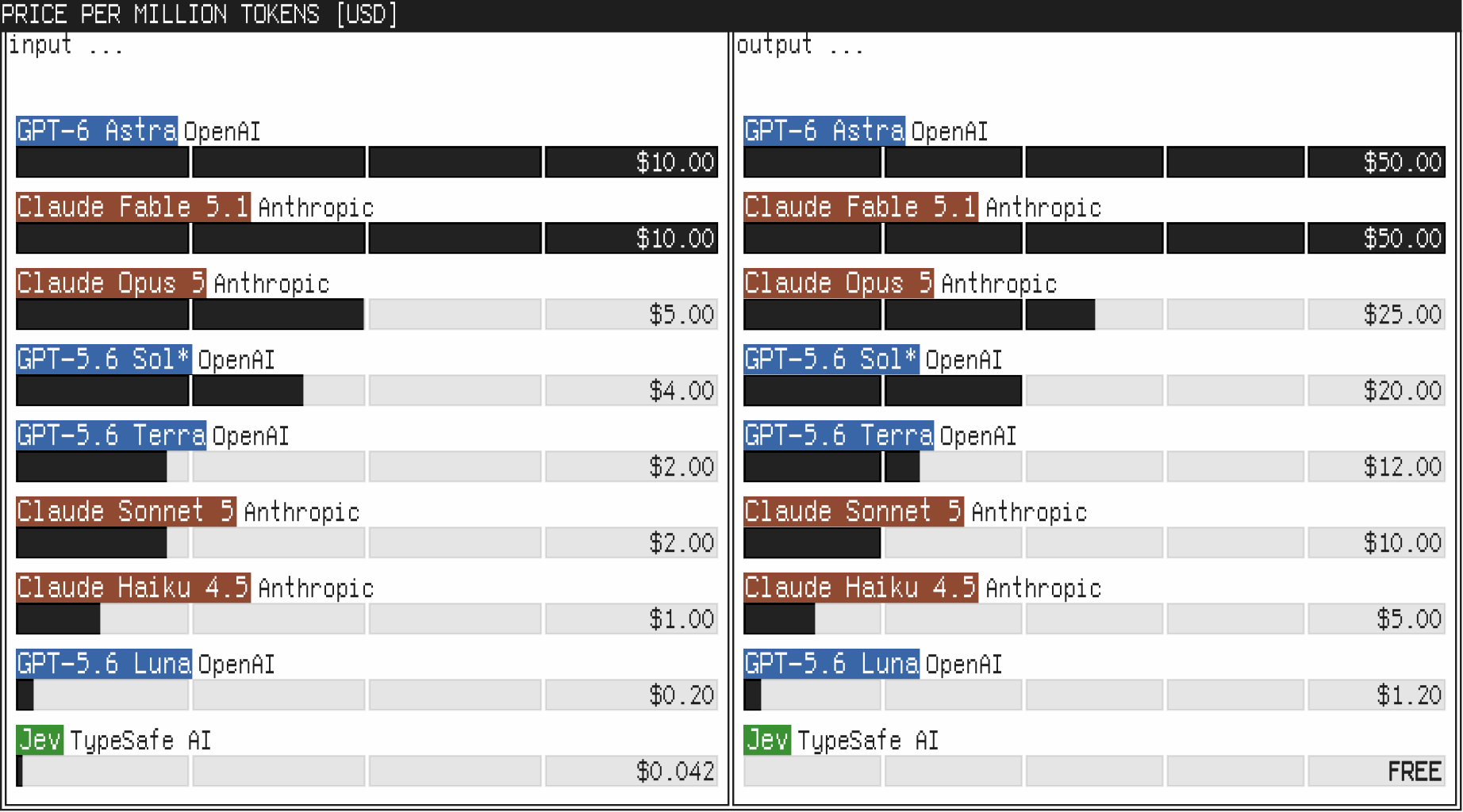
That explains their pricing model:
- Input tokens cost $0.042 per million ($42 per billion tokens).
- Output tokens are completely free.
They can offer free output tokens because they do not have an autoregressive decoding loop burning GPU compute on every token.
2. RLCD instead of RLHF
Most LLMs are trained with RLHF (Reinforcement Learning from Human Feedback). Human raters look at multiple chat responses and pick the one that sounds best.
The problem with that approach is well known. Models learn to sound confident, polite, and persuasive, even when they are completely wrong.
TypeSafe trained Jev using what they call RLCD (Reinforcement Learning for Calibrated Decisions).
Instead of rewarding conversational tone, the training rewards calibrated probabilities. If Jev gives a decision an 80% confidence score, it should be correct 80% of the time.
That matters a lot for code. If you want to automate a backend step, you need to know when the model is confident and when it is uncertain enough that a human should review it.
3. Guaranteed schema matching
When using LLMs, you usually wrap them with libraries like BAML or instructor to enforce schema validation. If the model returns broken JSON, the library tries to repair it or retries the call.
With Jev, the schema is not a prompt instruction. It is the structure of the model query itself.
| Metric | Standard LLMs | TypeSafe Jev |
|---|---|---|
| Output type | Text strings (requires parsing) | Typed values (Choice, Score, Noul) |
| Response time | 3 to 300+ seconds | 70 to 500 ms |
| Input cost | $0.20 to $10.00 / MTok | $0.042 / MTok |
| Output cost | Roughly 5x input cost (TypeSafe's own estimate) | Free ($0.00) |
| Generation style | Sequential (one token at a time) | Parallel sampling |
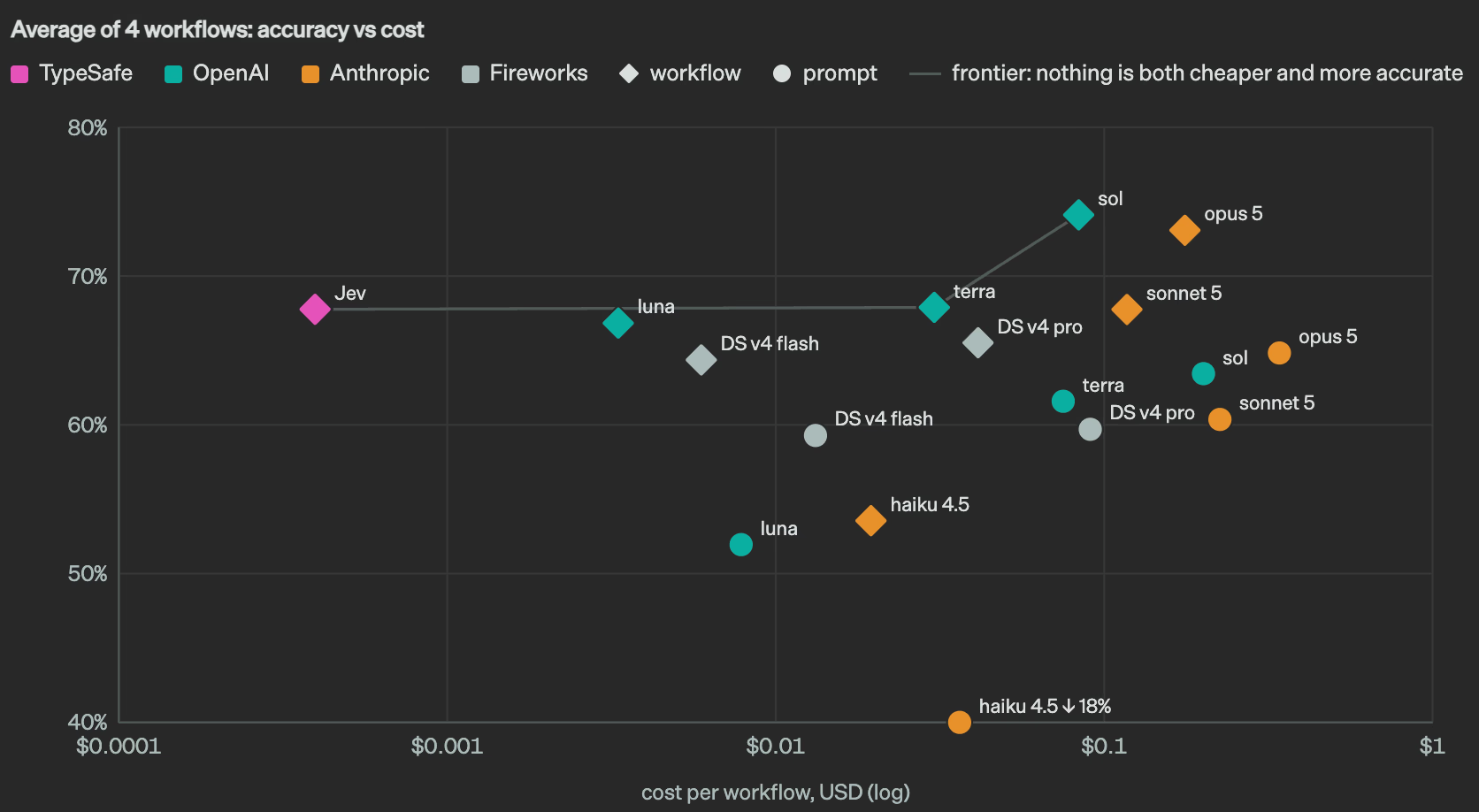
| Schema error rate | Up to 45%+ on some models (e.g. Claude Haiku) | 0% |
Because Jev only outputs probabilities across your defined options, it physically cannot emit malformed JSON.
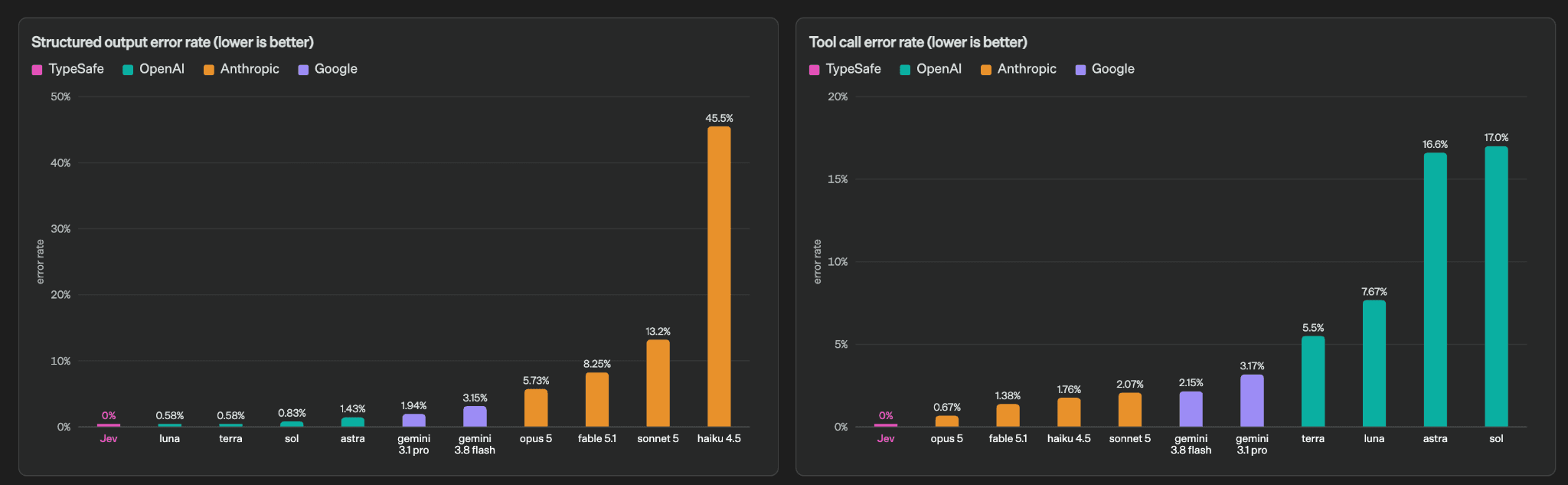
In TypeSafe's own structured-output benchmark, Claude Haiku failed to match the requested schema around 45% of the time. Other frontier models occasionally missed fields too, though far less often. Jev sits at zero because there is no raw string decoding to mess up.
Calling Jev vs Calling an LLM
To see the practical difference, look at what this looks like in TypeScript.
The usual LLM approach
With traditional models, you configure a schema and send a prompt:
1import { generateObject } from "ai"2import { openai } from "@ai-sdk/openai"3import { z } from "zod"4 5const TicketSchema = z.object({6 category: z.enum(["billing", "technical", "sales", "spam"]),7 priority: z.enum(["low", "medium", "high", "critical"]),8 needsEscalation: z.boolean(),9})10 11export async function triageTicket(emailBody: string) {12 // Takes roughly 2 to 4 seconds13 const response = await generateObject({14 model: openai("gpt-4o-mini"),15 schema: TicketSchema,16 prompt: `Classify this ticket: ${emailBody}`,17 })18 19 return response.object20}It works, but you are waiting multiple seconds for a simple classification, and you still need error handling in case parsing fails.
The System 1 approach
With Jev, you define the state and the questions directly:
1import { choice, noul, TypeSafeClient } from "@typesafe-ai/sdk"2 3const client = new TypeSafeClient()4 5export async function triageTicketFast(emailBody: string) {6 // Takes roughly 70 to 200 ms7 const { answers } = await client.systemOne({8 state: emailBody,9 questions: {10 category: choice("Categorize this support ticket", {11 billing: null,12 technical: null,13 sales: null,14 spam: null,15 }),16 priority: choice("Rate the urgency of this ticket", {17 low: null,18 medium: null,19 high: null,20 critical: null,21 }),22 needsEscalation: noul("Does this need human escalation?"),23 },24 })25 26 return {27 category: answers.category.choice,28 priority: answers.priority.choice,29 needsEscalation: answers.needsEscalation.probability > 0.5,30 confidence: answers.needsEscalation.probability,31 }32}No prompt engineering tricks, no markdown formatting warnings, and no JSON repair passes.
Where People Are Misusing It
As soon as the announcement went live, people started pitching wild use cases on Twitter.
A few of these ideas completely ignore how the model works.
1. Compacting agent context
Some developers suggested using Jev to compress context windows in agent tools. The idea was to take a long conversation history, have Jev pick which messages do not matter, and delete them.
That idea has several problems:
First, compaction is not just deleting lines from an array. It requires synthesizing what happened so far and keeping track of why certain decisions were made. Jev cannot write summaries.
Second, modifying past messages ruins prompt caching. Modern models rely on reusing KV caches from previous steps. If you delete line 4 in a 20-step history, the cache from line 4 onward is invalidated. You end up paying more in compute, not less.
Third, Jev has a 32k context window. Long agent threads routinely blow past that.
2. Using it as an LLM judge for code
Another pitch was using Jev to judge or score outputs from multiple LLMs against each other.
Code review is a reasoning task. You need to follow logic branches, trace variables, and think about edge cases.
Jev has zero multi-step reasoning. Asking a classification model to evaluate complex code will give you arbitrary scores.
3. Trying to build game bots with it
Theo from t3.gg tested Jev on a simple game of Checkers. He fed the board state as text and had Jev pick moves.
The moves came back almost instantly.
The problem was that the bot played terribly. It made legal moves, but it lost easily because it had no search tree, no forward planning, and no long-term strategy. It was just reacting to the current board layout like a reflex.
Where Jev Actually Makes Sense
If you do not try to force it into reasoning tasks, Jev fits naturally into standard backend plumbing:
Quick intake triage
If you process thousands of webhooks, bug reports, or customer emails, running an LLM on each one gets expensive and slow.
In early tests, Jev ran through 100 emails in batches at around 200 milliseconds per email, hitting 38 emails per second on basic workers. That makes high-volume triage realistic.
Edge guardrails and routing
You can put Jev in front of heavier models:
- Check if the user input is spam or off-topic (under 100ms).
- If it is a basic FAQ, route to a cached answer.
- If it requires actual thinking, send it to Claude or GPT.
You save money by keeping trivial requests away from your primary reasoning models.
Real-time UI updates
Most generative models are too slow for interactive interfaces. Waiting three seconds for a dropdown or filter to update feels sluggish.
At 70 to 150 milliseconds, Jev is fast enough to run behind autocomplete fields, search filters, or dynamic category pickers while the user is still interacting with the page.
The Jevons Paradox Connection
TypeSafe named the model after William Stanley Jevons, the 19th-century economist.
His paradox looked at coal usage after James Watt made steam engines more efficient. People expected coal consumption to drop. Instead, coal use shot up because steam power became cheap enough to use across dozens of new industries.
That is the best way to think about this model.
When structured AI decisions take four seconds and cost several cents, you only use them for big, visible features.
If those same decisions become instant, type-safe, and basically free, you start putting them inside ordinary backend loops, database triggers, and form validations.
Final Thoughts
We have spent the last couple of years watching companies release slightly better versions of the same general-purpose chat model.
General LLMs are great for writing and complex reasoning, but they are an awkward tool for deterministic backend software.
Jev is not going to replace your coding assistant.
What it does give you is a fast, reliable way to make fuzzy decisions inside code without dealing with string parsing or slow API calls.
I have not wired it into my own production stack yet. It will be interesting to see if teams actually adopt specialized System 1 models, or if people just keep using general LLMs for everything out of habit.
Sources & Links
- Introducing System One Models & Jev - Official launch post from TypeSafe AI
- TypeSafe AI - Product homepage and early access
- Theo's video review - t3.gg breakdown of Jev, including the Checkers and Doom demos